Whether you’re working on content, promotional materials or videos, digital art, making something creative requires time and effort. Therefore, in such cases, an AI art generator tool can be helpful.
There are now tools such as VanceAI Art Generator that aim to simplify the process of creating art. By using text prompts and utilizing intelligent algorithms users can easily generate artistic images. This means that even individuals, without technical expertise can still produce visually appealing artwork. Furthermore VanceAI also provides image editing and enhancement tools to help improve the quality of the images.
Overview of VanceAI Art Generator

Image Credit: VanceAI
VanceAI Image Generator offers a straightforward method for creating artwork. These utilities allow users to produce artistic images using written prompts and also provide image editing and improvement features that simplify the entire process of creating and perfecting images. By utilizing these technologies, people can unleash their creative potential, craft visually captivating artwork, and tackle some of the obstacles typically linked to digital art creation.
Online art galleries and platforms like DeviantArt or Behance provide spaces for artists to display their AI-generated artwork to a global audience. This exposure can lead to recognition, collaborations, or even sales of their work. Users can get a good start by combining their ideas with the technology provided by VanceAI.

Image Credit: Unsplash
VanceAI Art Generator is a valuable resource for novice artists, offering them substantial advantages in swiftly converting their creative concepts into tangible visuals. For artists who are just beginning, expressing their thoughts and ideas as actual images can frequently pose difficulties.
Nevertheless, due to VanceAI’s text prompts and advanced AI algorithms, newcomers can easily and quickly produce visual interpretations of their concepts. It also enables users to upload an image that they would like the tool to emulate. Another valuable benefit of utilizing the VanceAI Art Generator is the capacity to explore numerous ideas without having to commit excessive time and effort.
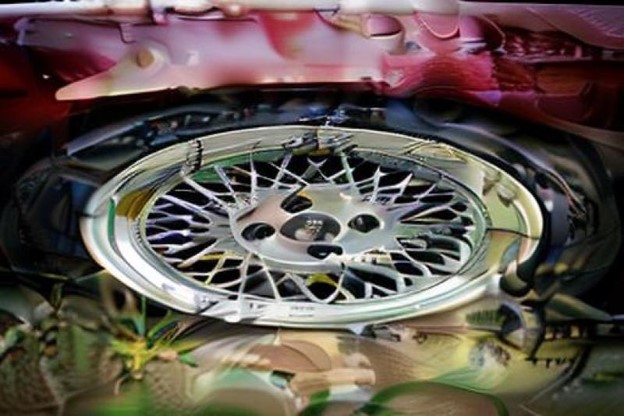
Image Credit: VanceAI
VanceAI offers a range of tools that can be effectively employed to enhance the images generated by the VanceAI Art Generator. Firstly, the AI Image Enhancer can be used to refine the overall quality of the artwork by adjusting factors like brightness, contrast, and sharpness. This ensures that the final image meets the artist’s desired aesthetic standards. Secondly, the AI Background Remover is a valuable tool for isolating the subject of the artwork from its background, providing flexibility in design and enabling users to insert their creations seamlessly into various contexts.
Guide for Using VanceAI Art Generator Online
Step 1: To get started, access the AI Art Generator by following the link provided. This link will direct you to the dedicated website. Once you’ve arrived at the website, find and click on the yellow marked button labeled “Try AI Generator”.
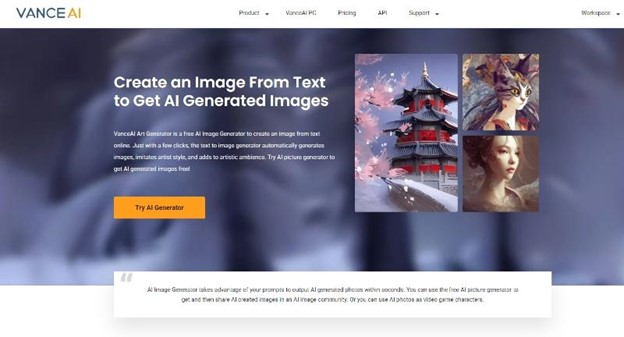
Image Credit: VanceAI
Step 2: In the workspace of the AI Art Generator, you’ll encounter a designated text input area tailored for describing the kind of art you want to create. Enter your desired input and make any necessary selections or adjustments. Click on “Create”.
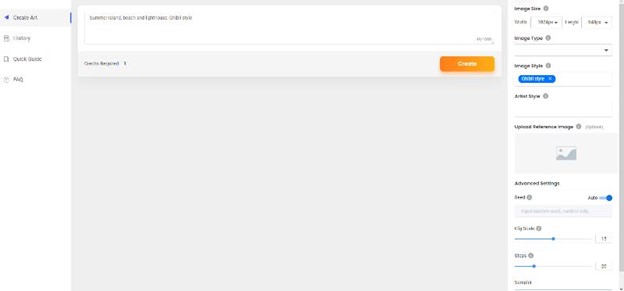
Image Credit: VanceAI
Step 3: The Art Generator will start working on the image and it may take a few seconds or more. The image will then be displayed on the screen and you can use the download option to save it.
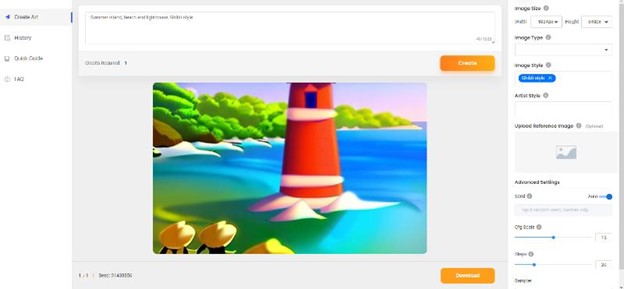
Image Credit: VanceAI
Refine Your Artwork with Toongineer Cartoonizer
VanceAI Toongineer Cartoonizer is a software tool that utilizes Artificial Intelligence to transform regular photos or images into cartoon-style artworks. It applies various artistic filters and enhancements to convert photos into vibrant and engaging cartoon-like illustrations.
Step 1: Click on the link given above to get to the website first. From there, you can click on the “Upload Image” button to go to the Workspace.
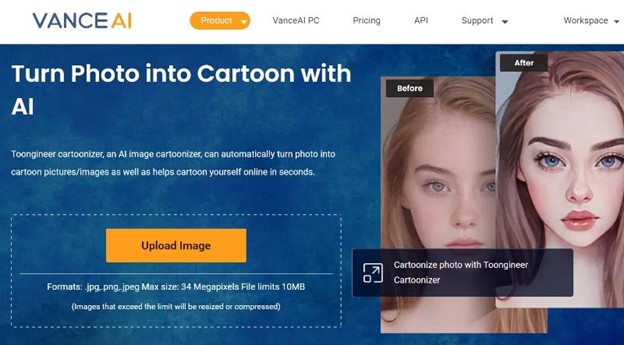
Image Credit: VanceAI
Step 2: The tool typically focuses on portraits, hence the male and female options. However, the tool’s algorithms are capable of working on objects as well. Therefore, upload an image and choose any option you like. Click on “Start to Process” when you are ready.
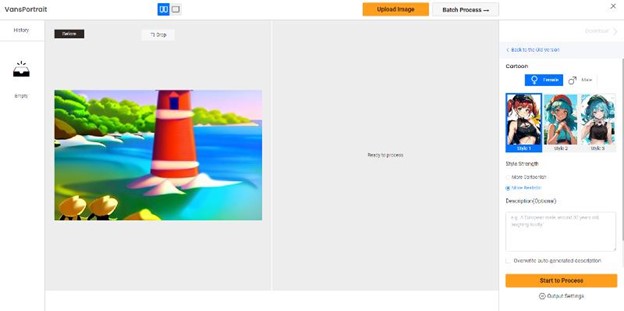
Image Credit: VanceAI
Step 3: The tool will work on the image and you will see a fully refined version of the image in a few seconds. You can then click on “Download Image” to save the photo on your device.
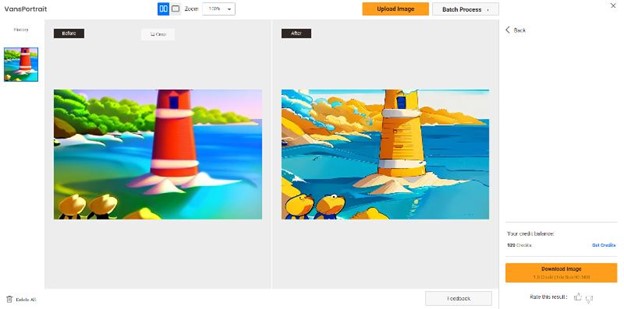
Image Credit: VanceAI
VanceAI Pricing
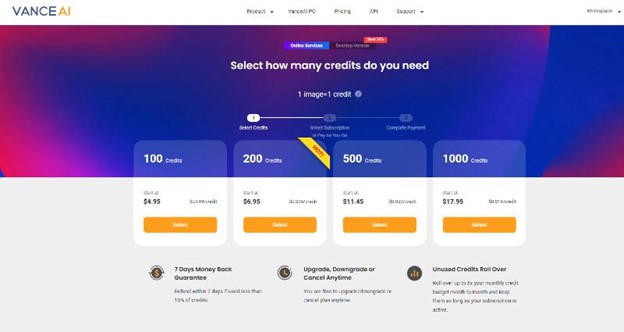
Image Credit: VanceAI
Getting started with VanceAI is straightforward. Users can register on the VanceAI website by either linking their Google account or following a conventional sign-up process. The free version grants access to the platform’s features and provides 3 image credits monthly, which can be utilized throughout the VanceAI platform.
For users in need of additional image credits and exclusive features, VanceAI offers cost-effective premium subscription choices. The basic subscription plan starts at just $4.95 per month. Subscribers to this plan receive 100 image credits and access to exclusive features not accessible to free users.
Other Tools Offered by VanceAI
VanceAI PC represents a software iteration of the VanceAI platform, aimed at enhancing the user experience. Although it may not encompass all the online tools currently accessible, VanceAI PC continually evolves, introducing novel features to enhance user satisfaction and usability.
For the streamlined management of PDF files, users can conveniently turn to VancePDF.com, a specialized platform designed exclusively for handling PDF documents. This platform offers a diverse array of useful functions, including but not limited to splitting, merging, and converting JPG to PNG.
Additionally, VanceAI offers an all-round editing tool named VanceAI Photo Editor, a versatile image editing tool equipped with an array of valuable features. These features encompass image enlargement, cropping, rotation, background removal, and more. With these tools at their disposal, artists and users gain enhanced control over their editing tasks.
VanceAI also offers many more products in the video, picture, and even E-commerce areas, such as AI Photo Restorer to repair outdated images, AI Video Enhancer to improve video definition, and AI product image generator to bring your creative ideas to life.
Final Verdict
VanceAI Art Generator stands out as a user-friendly and accessible tool that caters to a wide range of users. This accessibility is owed in large part to its well-crafted user interface, which makes navigation and utilization intuitive for both beginners and experienced users alike. Furthermore, VanceAI offers notably affordable pricing plans, starting with a modest $4.95 per month subscription. This subscription not only provides users access to the complete VanceAI tools suite but also represents an excellent value.
One area where the AI Image Generator could enhance its performance is in the quality of its outputs. There’s room for improvement in refining the algorithms to produce more detailed and refined results. Nonetheless, in situations where users seek to achieve exceptional outcomes, a combination of the AI Image Generator and the Toongineer Cartoonizer can yield impressive results.